
移除画面物体工作流 Object removal workflow
4.0
2 reviews

Description
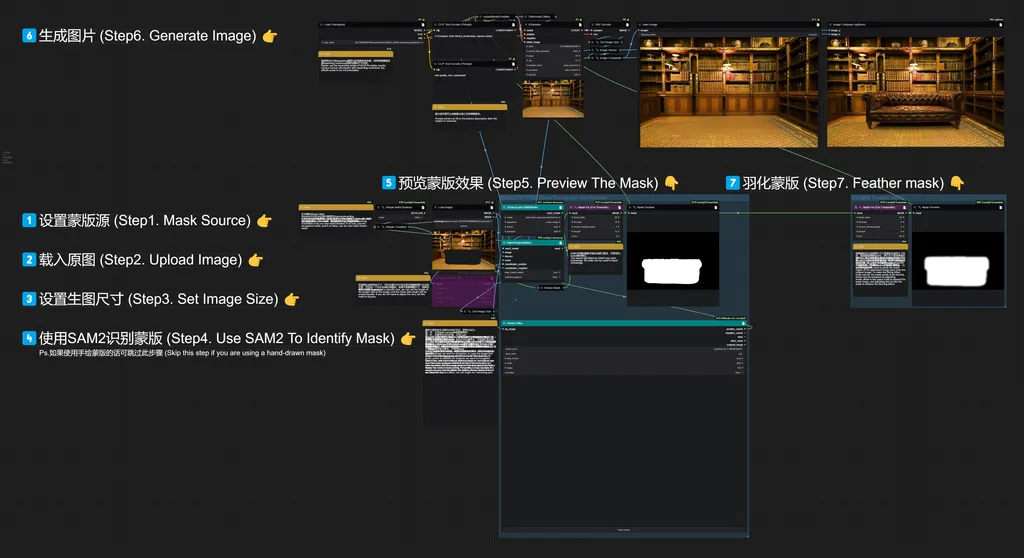
本工作流可实现移除画面中占面积很大的物体,并将移除后的区域填充完整。
This workflow can remove large objects in the picture and fill the removed area completely.
有的时候我们看到一张图,觉得背景很好看,但是画面主体所占面积很大,在这个时候我们就可以使用此工作流将画面主体移除,得到一张空的背景图。
或者有时我们想去掉画面中的某个占很大面积的物体时,可以使用此工作流。
Sometimes we see a picture and think the background is very nice, but the main subject of the picture occupies a large area. At this time, we can use this workflow to remove the subject of the picture and get an empty background image.
Or sometimes we want to remove a large area of the picture, we can use this workflow.
注:我在工作流中写了很详细的注释(即黄色的Note节点中的内容),里面包含各功能模块的使用方法和建议,在使用前建议大家先阅读注释中的内容。
PS. I have written a very detailed note in the workflow (that is, the content in the yellow Note node), which contains the use method and advice of each function module. I recommend you to read the content in the comment before using it.
英语母语的朋友,请原谅我的塑料英语,可能出现翻译不准确的情况(。・_・。)ノI'm sorry~
Native English speakers, please forgive my English is not good enough, there may be inaccurate translation situation.
(。・_・。)ノI'm sorry~
Discussion
(No comments yet)
Loading...

Resources (4)
Reviews
No reviews yet
Versions (2)
- latest (a year ago)
- v20240906-092815
Node Details
Primitive Nodes (25)
DF_Image_scale_to_side (1)
DownloadAndLoadSAM2Model (1)
Image Comparer (rgthree) (1)
ImageComposite+ (1)
Label (rgthree) (8)
MaskFix+ (2)
Note (7)
PointsEditor (1)
Sam2Segmentation (1)
SimpleCondition+ (1)
SimpleMathBoolean+ (1)
Custom Nodes (15)
ComfyUI
- DifferentialDiffusion (1)
- VAEDecode (1)
- LoadImage (1)
- SaveImage (1)
- KSampler (1)
- CLIPTextEncode (2)
- InpaintModelConditioning (1)
- CheckpointLoaderSimple (1)
- GetImageSize+ (2)
- ImageResize+ (1)
- MaskPreview+ (2)
- ResizeMask (1)
Model Details
Checkpoints (1)
SD1.5\INPAINTING\realisticVisionV60B1_v51VAE-inpainting.safetensors
LoRAs (0)