
kolos+ipa+Florence+unionCN(automation 4 in 1)
5.0
0 reviews


Description
这个工作流结合了kolos+kolos的ipa+目前非常不错的自动推理模型Florence+sdxl最新的controlnet-union-sdxl-1.0
核心:来自中国快手,世界可图的kolos
项目地址: https://github.com/kijai/ComfyUI-KwaiKolorsWrapper
整体采用布尔去控制是否使用ipa参考和是否使用提示词反推
使用布尔控制是否使用反推单纯的是懒得把线连来连去...不使用反推提示词作为输入布尔值为0,反之为1(注意看旁边注释哪个布尔对应的哪一个)
总之,你可以用Florence先跑一遍,然后看看提示词满不满意,然后再把提示词复制到输入框进行编辑修改
插件地址:https://github.com/kijai/ComfyUI-Florence2
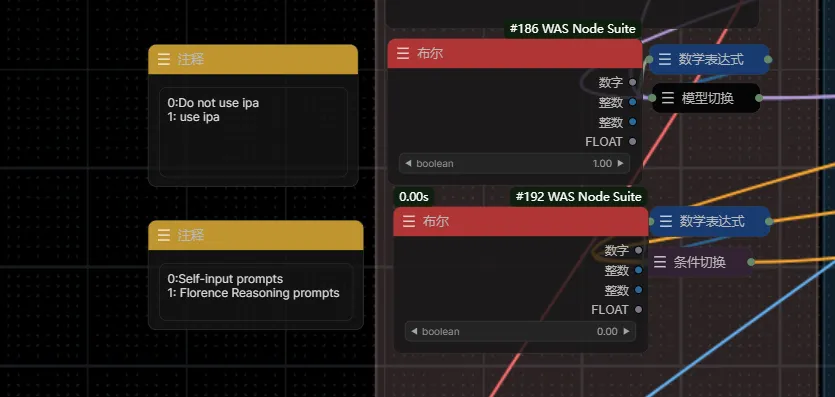
ipa:最新的效果真心不错推荐试试 mz和cubiq的都可以适配,不使用ipa作为参考布尔值为0,反之为1(注意看旁边注释哪个布尔对应的哪一个)
插件地址: https://github.com/MinusZoneAI/ComfyUI-Kolors-MZ
https://github.com/cubiq/ComfyUI_IPAdapter_plus (请将你的ipa更新到最新)
官方IP-Adapter-Plus模型下载地址
模型主页: https://huggingface.co/Kwai-Kolors/Kolors-IP-Adapter-Plus
https://huggingface.co/Kwai-Kolors/Kolors-IP-Adapter-Plus/resolve/main/ip_adapter_plus_general.bin 下载至 models/ipadapter/
https://huggingface.co/Kwai-Kolors/Kolors-IP-Adapter-Plus/resolve/main/image_encoder/pytorch_model.bin 下载至 models/clip_vision/
Controlnet:controlnet-union-sdxl-1.0 (请将你的comfyui-advance-controlnet更新到最新即可)
ProMax 型号已发布!!12 个控制 + 5 个高级编辑,告别复杂的选择
模型下载地址: https://huggingface.co/xinsir/controlnet-union-sdxl-1.0/tree/main
在这里选择图生图or文生图

This workflow combines Kolos+Kolos' IPA+ the currently excellent automated reasoning model Florence + the latest ControlNet model SDXL-Union-SDXL-1.0.
Core: From China’s Kuaishou, the globally available Kolos.
Project address: https://github.com/kijai/ComfyUI-KwaiKolorsWrapper
The overall process uses Boolean controls to decide whether to use IPA reference and whether to use reverse-prompt inference. Using Boolean control to avoid the hassle of connecting lines... If not using reverse-prompt, the Boolean value is 0, otherwise, it's 1 (check the adjacent comments for which Boolean corresponds to which one).
In short, you can first run Florence to see if you are satisfied with the prompts, then copy and edit the prompts in the input box.
Plugin address: https://github.com/kijai/ComfyUI-Florence2
IPA: The latest effects are really good, highly recommended to try. Both MZ and Cubiq are compatible.
Plugin addresses:
- https://github.com/MinusZoneAI/ComfyUI-Kolors-MZ
- https://github.com/cubiq/ComfyUI_IPAdapter_plus (Please update your IPA to the latest version)
Official IP-Adapter-Plus Model Download Address
Model homepage: https://huggingface.co/Kwai-Kolors/Kolors-IP-Adapter-Plus
Download to models/ipadapter/: ip_adapter_plus_general.bin
Download to models/clip_vision/: pytorch_model.bin
ControlNet: ControlNet-Union-SDXL-1.0 (Please update your ComfyUI-Advance-ControlNet to the latest version)
ProMax Model Released!! 12 controls + 5 advanced edits, goodbye to complex selections.
Model download address: https://huggingface.co/xinsir/controlnet-union-sdxl-1.0/tree/main
here choice i2i/t2i
Discussion
(No comments yet)
Loading...

Reviews
No reviews yet
Versions (1)
- latest (a year ago)
Node Details
Primitive Nodes (15)
DownloadAndLoadFlorence2Model (1)
Florence2Run (1)
MZ_ChatGLM3Loader (1)
MZ_ChatGLM3_V2 (3)
MZ_KolorsControlNetPatch (1)
MZ_KolorsUNETLoaderV2 (1)
Note (4)
Reroute (2)
SetUnionControlNetType (1)
Custom Nodes (24)
- ArgosTranslateTextNode (1)
- CR Model Input Switch (1)
- CR Conditioning Input Switch (1)
ComfyUI
- LoadImage (2)
- VAELoader (1)
- CLIPVisionLoader (1)
- PreviewImage (1)
- EmptyLatentImage (1)
- KSampler (1)
- VAEDecode (1)
- VAEEncode (1)
- SaveImage (1)
- AIO_Preprocessor (1)
- IPAdapterModelLoader (1)
- IPAdapterMS (1)
- ControlNetLoaderAdvanced (1)
- ACN_AdvancedControlNetApply (1)
- MathExpression|pysssss (2)
- ShowText|pysssss (2)
- Logic Boolean (2)
Model Details
Checkpoints (0)
LoRAs (0)