
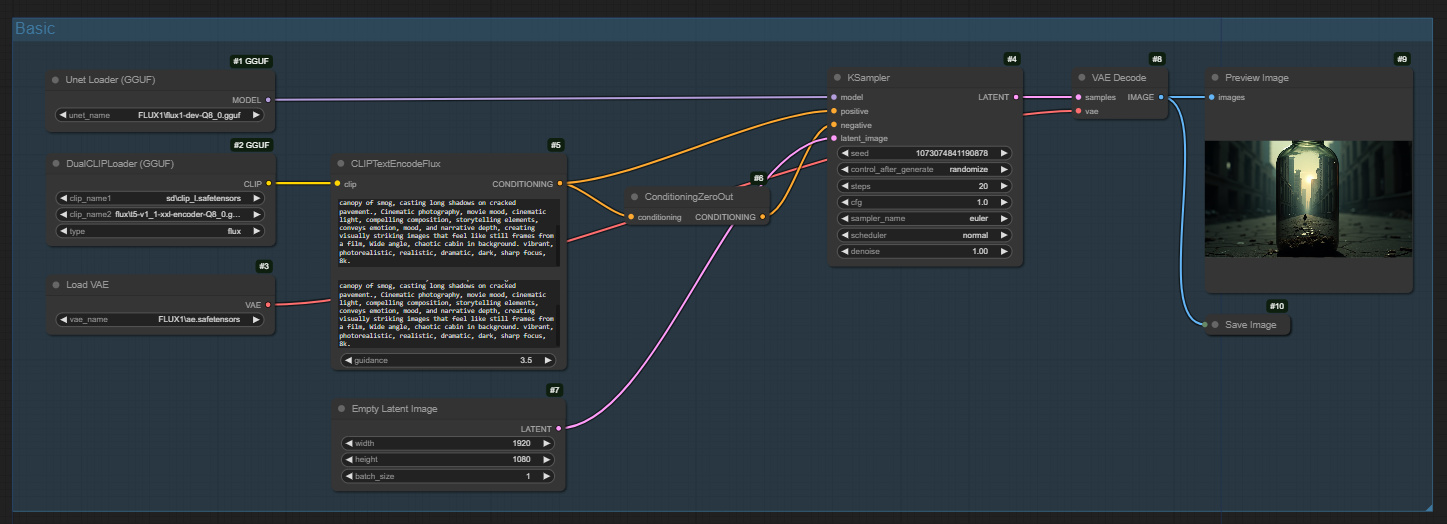
Flux 1 - Dev - GGUF - Basic
5.0
0 reviews1
7.0K
895
1

Description
Flux 1 - Dev - GGUF - Basic
Install Plugins and Download Models
- Download the Flux GGUF dev model(opens in a new tab) or the Flux GGUF schnell model(opens in a new tab) and place the model files in the
comfyui/models/unetdirectory. - Download t5-v1_1-xxl-encoder-gguf(opens in a new tab), and place the model files in the
comfyui/models/clipdirectory. - Download clip_l.safetensors(opens in a new tab) and place the model files in the
comfyui/models/clipdirectory. - Download ae.safetensors(opens in a new tab) and place the model files in the
comfyui/models/vaedirectory, and rename it toflux_ae.safetensors. - Install ComfyUI-GGUF(opens in a new tab) plugin, if you don't know how to install the plugin, you can refer to ComfyUI Plugin Installation Guide
Refs:
Discussion
(No comments yet)
Loading...

Reviews
No reviews yet
Versions (1)
- latest (a year ago)
Node Details
Primitive Nodes (3)
CLIPTextEncodeFlux (1)
DualCLIPLoaderGGUF (1)
UnetLoaderGGUF (1)
Custom Nodes (7)
ComfyUI
- ConditioningZeroOut (1)
- VAELoader (1)
- PreviewImage (1)
- VAEDecode (1)
- SaveImage (1)
- EmptyLatentImage (1)
- KSampler (1)
Model Details
Checkpoints (0)
LoRAs (0)