
Image manipulation with unsampler (Textual Inpaint) advanced
5.0
0 reviews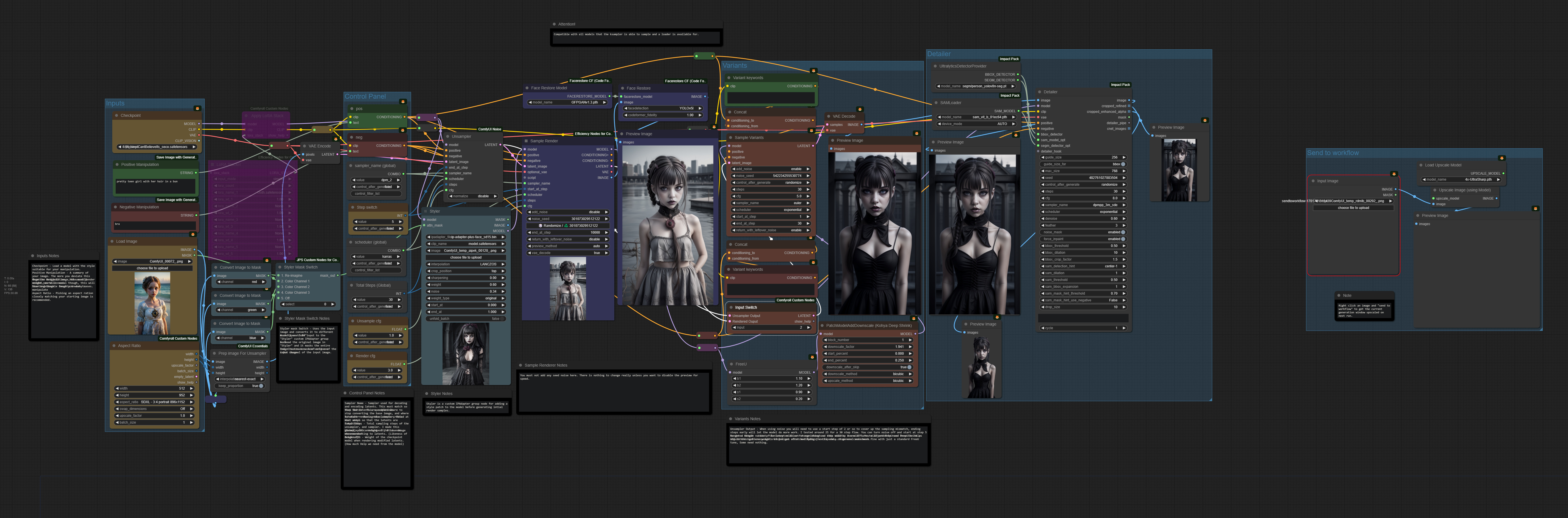
Description
V2.0 Adds the advanced manipulation workflow.
What this workflow does
Provides a pre existing image manipulation technique using the unsampler node.
How to use this workflow
Positive Manipulation - A summary of your image. The more you deviate this from the original image, the more Render weight you will need.
Negative Manipulation - Not usually needed, works as usual though, this will have undesirable results in many cases.
Checkpoint - Load a model with the style suitable for your manipulation.
Starting Image - Image you wish to manipulate
Aspect Ratio - Picking an aspect ration closely matching your starting image is recommended.
Tips about this workflow
Sampler Name - Sampler used for decoding and encoding latents. This must match so that the latents are compatible.
Step Switch - This specifies where to stop converting the base image, and where to start rendering the latents created at that step.
Scheduler - Basic noise sampler, This must match so that the latents are compatible.
Total Steps - Total sampling steps of the unsampler, and sampler. I made this global, you can change it, It is not recommended.
Unsample CFG - Weight of the base image when converting to latents. (Likeness of original)
Render CFG - Weight of the checkpoint model when rendering modified latents. (How much Help we need from the model)
Tip jar HERE
Discussion
(No comments yet)
Loading...
Author

Reviews
No reviews yet
Versions (2)
- latest (2 years ago)
- v20231203-215335
Node Details
Primitive Nodes (25)
Note (8)
PrimitiveNode (6)
Reroute (10)
workflow/IPAdapter Input (1)
Custom Nodes (40)
- CR Apply LoRA Stack (1)
- CR Aspect Ratio (1)
- CR Latent Input Switch (1)
ComfyUI
- unCLIPCheckpointLoader (1)
- CLIPTextEncode (4)
- PreviewImage (6)
- ConditioningConcat (2)
- ImageUpscaleWithModel (1)
- UpscaleModelLoader (1)
- LoadImage (2)
- PatchModelAddDownscale (1)
- VAEEncode (1)
- VAEDecode (1)
- ImageToMask (3)
- FreeU (1)
- KSamplerAdvanced (1)
- ImageResize+ (1)
- SAMLoader (1)
- FaceDetailer (1)
- UltralyticsDetectorProvider (1)
- BNK_Unsampler (1)
- LoRA Stacker (1)
- KSampler Adv. (Efficient) (1)
- FaceRestoreCFWithModel (1)
- FaceRestoreModelLoader (1)
- Mask Switch (JPS) (1)
- String Literal (2)
Model Details
Checkpoints (1)
1.5\icbinpICantBelieveIts_seco.safetensors
LoRAs (1)
Goth.safetensors